
Run Application Localy with Docker Compose
Run Application Localy with Docker Compose
Run Application Localy with Docker Compose
Pada artikel ini, kita akan membahas bagaimana cara menjalankan aplikasi Rumah Sakit Sejahtera secara lokal menggunakan Docker Compose. Aplikasi ini merupakan contoh implementasi DevSecOps yang dapat digunakan untuk memahami alur kerja dalam pengembangan perangkat lunak yang aman dan efisien.
Prerequisites
Aplikasi Appoinment RS.Sejahtera ini mengunakan :
-
Laravel 8
-
PHP 8.1
-
Mysql-server 8.0
-
Composer latest
-
Nodejs 16
Getting Started
$ git clone https://github.com/mdrdani/appointmentApp.git
$ cd appoinmentApp
$ cp .env.example .env
$ composer update
$ php artisan key:generate

*** setting environment mysql sebelum migrate ***

$ php artisan migrate:fresh --seed
$ npm install && npm run build
Docker Configuration
Dockerfile
FROM php:8.1-apache

# Install packages
RUN apt-get update && apt-get install -y \
    git \
    zip \
    curl \
    sudo \
    unzip \
    libicu-dev \
    libbz2-dev \
    libpng-dev \
    libjpeg-dev \
    libmcrypt-dev \
    libreadline-dev \
    libfreetype6-dev \
    g++

# Apache configuration
ENV APACHE_DOCUMENT_ROOT=/var/www/html/public
RUN sed -ri -e 's!/var/www/html!${APACHE_DOCUMENT_ROOT}!g' /etc/apache2/sites-available/*.conf
RUN sed -ri -e 's!/var/www/!${APACHE_DOCUMENT_ROOT}!g' /etc/apache2/apache2.conf /etc/apache2/conf-available/*.conf
RUN a2enmod rewrite headers

# Common PHP Extensions
RUN docker-php-ext-install \
    bz2 \
    intl \
    iconv \
    bcmath \
    opcache \
    calendar \
    pdo_mysql

# Ensure PHP logs are captured by the container
ENV LOG_CHANNEL=stderr

# Set a volume mount point for your code
VOLUME /var/www/html

# Copy code and run composer
COPY --from=composer:latest /usr/bin/composer /usr/bin/composer
COPY . /var/www/tmp
RUN cd /var/www/tmp && composer install --no-dev

# Ensure the entrypoint file can be run
RUN chmod +x /var/www/tmp/docker-entrypoint.sh
ENTRYPOINT ["/var/www/tmp/docker-entrypoint.sh"]

# The default apache run command
CMD ["apache2-foreground"]#!/bin/bash
cp -R /var/www/tmp/. /var/www/html/
chown -R www-data:www-data /var/www/html
exec "$@".docker-ignore
.env
/vendor
docker-compose.yaml
version: '3.5'
services:
  php:
    image: cehamot/rssejahterapp:latest
    restart: always
    ports:
      - 8000:80
    environment:
      - APP_KEY="base64:V0xAWsrcyAPMY1+kgysAWm2ptVSA11+UAu78o/MqDjI="
      - APP_ENV=local
      - APP_DEBUG=true
      - DB_PORT=3306
      - DB_HOST=mysql
      - DB_DATABASE
      - DB_USERNAME
      - DB_PASSWORD
  mysql:
    image: mysql/mysql-server:8.0
    restart: always
    environment:
      - MYSQL_ROOT_PASSWORD=${DB_ROOT_PASSWORD}
      - MYSQL_DATABASE=${DB_DATABASE}
      - MYSQL_USER=${DB_USERNAME}
      - MYSQL_PASSWORD=${DB_PASSWORD}
    volumes:
      - ./db/init.sql:/docker-entrypoint-initdb.d/init.sql
init.sql
-- --------------------------------------------------------
-- Host:                         127.0.0.1
-- Server version:               8.0.32-0ubuntu0.22.04.2 - (Ubuntu)
-- Server OS:                    Linux
-- HeidiSQL Version:             11.3.0.6295
-- --------------------------------------------------------

/*!40101 SET @OLD_CHARACTER_SET_CLIENT=@@CHARACTER_SET_CLIENT */;
/*!40101 SET NAMES utf8 */;
/*!50503 SET NAMES utf8mb4 */;
/*!40014 SET @OLD_FOREIGN_KEY_CHECKS=@@FOREIGN_KEY_CHECKS, FOREIGN_KEY_CHECKS=0 */;
/*!40101 SET @OLD_SQL_MODE=@@SQL_MODE, SQL_MODE='NO_AUTO_VALUE_ON_ZERO' */;
/*!40111 SET @OLD_SQL_NOTES=@@SQL_NOTES, SQL_NOTES=0 */;


-- Dumping database structure for db_bookingrs
DROP DATABASE IF EXISTS `db_rssejahtera`;
CREATE DATABASE IF NOT EXISTS `db_rssejahtera` /*!40100 DEFAULT CHARACTER SET utf8mb4 COLLATE utf8mb4_0900_ai_ci */ /*!80016 DEFAULT ENCRYPTION='N' */;
USE `db_rssejahtera`;

-- Dumping structure for table db_bookingrs.daily_slots
DROP TABLE IF EXISTS `daily_slots`;
CREATE TABLE IF NOT EXISTS `daily_slots` (
  `id` bigint unsigned NOT NULL AUTO_INCREMENT,
  `name` varchar(255) COLLATE utf8mb4_unicode_ci NOT NULL,
  `quota` int NOT NULL,
  `is_active` tinyint(1) NOT NULL,
  `created_at` timestamp NULL DEFAULT NULL,
  `updated_at` timestamp NULL DEFAULT NULL,
  PRIMARY KEY (`id`)
) ENGINE=InnoDB AUTO_INCREMENT=3 DEFAULT CHARSET=utf8mb4 COLLATE=utf8mb4_unicode_ci;

-- Dumping data for table db_bookingrs.daily_slots: ~2 rows (approximately)
/*!40000 ALTER TABLE `daily_slots` DISABLE KEYS */;
INSERT INTO `daily_slots` (`id`, `name`, `quota`, `is_active`, `created_at`, `updated_at`) VALUES
	(1, 'Pagi: 08:00 - 11:00', 30, 1, '2023-03-08 09:10:45', '2023-03-08 09:10:45'),
	(2, 'Siang: 13:00 - 15:00', 30, 1, '2023-03-08 09:10:45', '2023-03-08 09:10:45');
/*!40000 ALTER TABLE `daily_slots` ENABLE KEYS */;

-- Dumping structure for table db_bookingrs.failed_jobs
DROP TABLE IF EXISTS `failed_jobs`;
CREATE TABLE IF NOT EXISTS `failed_jobs` (
  `id` bigint unsigned NOT NULL AUTO_INCREMENT,
  `uuid` varchar(255) COLLATE utf8mb4_unicode_ci NOT NULL,
  `connection` text COLLATE utf8mb4_unicode_ci NOT NULL,
  `queue` text COLLATE utf8mb4_unicode_ci NOT NULL,
  `payload` longtext COLLATE utf8mb4_unicode_ci NOT NULL,
  `exception` longtext COLLATE utf8mb4_unicode_ci NOT NULL,
  `failed_at` timestamp NOT NULL DEFAULT CURRENT_TIMESTAMP,
  PRIMARY KEY (`id`),
  UNIQUE KEY `failed_jobs_uuid_unique` (`uuid`)
) ENGINE=InnoDB DEFAULT CHARSET=utf8mb4 COLLATE=utf8mb4_unicode_ci;

-- Dumping data for table db_bookingrs.failed_jobs: ~0 rows (approximately)
/*!40000 ALTER TABLE `failed_jobs` DISABLE KEYS */;
/*!40000 ALTER TABLE `failed_jobs` ENABLE KEYS */;

-- Dumping structure for table db_bookingrs.migrations
DROP TABLE IF EXISTS `migrations`;
CREATE TABLE IF NOT EXISTS `migrations` (
  `id` int unsigned NOT NULL AUTO_INCREMENT,
  `migration` varchar(255) COLLATE utf8mb4_unicode_ci NOT NULL,
  `batch` int NOT NULL,
  PRIMARY KEY (`id`)
) ENGINE=InnoDB AUTO_INCREMENT=10 DEFAULT CHARSET=utf8mb4 COLLATE=utf8mb4_unicode_ci;

-- Dumping data for table db_bookingrs.migrations: ~0 rows (approximately)
/*!40000 ALTER TABLE `migrations` DISABLE KEYS */;
INSERT INTO `migrations` (`id`, `migration`, `batch`) VALUES
	(1, '2014_10_12_000000_create_users_table', 1),
	(2, '2014_10_12_100000_create_password_resets_table', 1),
	(3, '2014_10_12_200000_add_two_factor_columns_to_users_table', 1),
	(4, '2019_08_19_000000_create_failed_jobs_table', 1),
	(5, '2019_12_14_000001_create_personal_access_tokens_table', 1),
	(6, '2022_09_15_143033_create_daily_slots_table', 1),
	(7, '2022_09_15_144411_create_orders_table', 1),
	(8, '2022_09_15_153942_add_field_day_to_orders_table', 1),
	(9, '2022_09_22_084228_create_sessions_table', 1);
/*!40000 ALTER TABLE `migrations` ENABLE KEYS */;

-- Dumping structure for table db_bookingrs.orders
DROP TABLE IF EXISTS `orders`;
CREATE TABLE IF NOT EXISTS `orders` (
  `id` bigint unsigned NOT NULL AUTO_INCREMENT,
  `daily_slot_id` bigint unsigned NOT NULL,
  `day` date DEFAULT NULL,
  `user_id` bigint unsigned DEFAULT NULL,
  `name` varchar(50) COLLATE utf8mb4_unicode_ci NOT NULL,
  `age` varchar(5) COLLATE utf8mb4_unicode_ci NOT NULL,
  `phone_number` varchar(15) COLLATE utf8mb4_unicode_ci NOT NULL,
  `note` varchar(255) COLLATE utf8mb4_unicode_ci NOT NULL,
  `status` char(1) COLLATE utf8mb4_unicode_ci NOT NULL COMMENT '0: pending, 1:active, 2:complete, 3:cancel',
  `created_at` timestamp NULL DEFAULT NULL,
  `updated_at` timestamp NULL DEFAULT NULL,
  PRIMARY KEY (`id`)
) ENGINE=InnoDB DEFAULT CHARSET=utf8mb4 COLLATE=utf8mb4_unicode_ci;

-- Dumping data for table db_bookingrs.orders: ~0 rows (approximately)
/*!40000 ALTER TABLE `orders` DISABLE KEYS */;
/*!40000 ALTER TABLE `orders` ENABLE KEYS */;

-- Dumping structure for table db_bookingrs.password_resets
DROP TABLE IF EXISTS `password_resets`;
CREATE TABLE IF NOT EXISTS `password_resets` (
  `email` varchar(255) COLLATE utf8mb4_unicode_ci NOT NULL,
  `token` varchar(255) COLLATE utf8mb4_unicode_ci NOT NULL,
  `created_at` timestamp NULL DEFAULT NULL,
  KEY `password_resets_email_index` (`email`)
) ENGINE=InnoDB DEFAULT CHARSET=utf8mb4 COLLATE=utf8mb4_unicode_ci;

-- Dumping data for table db_bookingrs.password_resets: ~0 rows (approximately)
/*!40000 ALTER TABLE `password_resets` DISABLE KEYS */;
/*!40000 ALTER TABLE `password_resets` ENABLE KEYS */;

-- Dumping structure for table db_bookingrs.personal_access_tokens
DROP TABLE IF EXISTS `personal_access_tokens`;
CREATE TABLE IF NOT EXISTS `personal_access_tokens` (
  `id` bigint unsigned NOT NULL AUTO_INCREMENT,
  `tokenable_type` varchar(255) COLLATE utf8mb4_unicode_ci NOT NULL,
  `tokenable_id` bigint unsigned NOT NULL,
  `name` varchar(255) COLLATE utf8mb4_unicode_ci NOT NULL,
  `token` varchar(64) COLLATE utf8mb4_unicode_ci NOT NULL,
  `abilities` text COLLATE utf8mb4_unicode_ci,
  `last_used_at` timestamp NULL DEFAULT NULL,
  `expires_at` timestamp NULL DEFAULT NULL,
  `created_at` timestamp NULL DEFAULT NULL,
  `updated_at` timestamp NULL DEFAULT NULL,
  PRIMARY KEY (`id`),
  UNIQUE KEY `personal_access_tokens_token_unique` (`token`),
  KEY `personal_access_tokens_tokenable_type_tokenable_id_index` (`tokenable_type`,`tokenable_id`)
) ENGINE=InnoDB DEFAULT CHARSET=utf8mb4 COLLATE=utf8mb4_unicode_ci;

-- Dumping data for table db_bookingrs.personal_access_tokens: ~0 rows (approximately)
/*!40000 ALTER TABLE `personal_access_tokens` DISABLE KEYS */;
/*!40000 ALTER TABLE `personal_access_tokens` ENABLE KEYS */;

-- Dumping structure for table db_bookingrs.sessions
DROP TABLE IF EXISTS `sessions`;
CREATE TABLE IF NOT EXISTS `sessions` (
  `id` varchar(255) COLLATE utf8mb4_unicode_ci NOT NULL,
  `user_id` bigint unsigned DEFAULT NULL,
  `ip_address` varchar(45) COLLATE utf8mb4_unicode_ci DEFAULT NULL,
  `user_agent` text COLLATE utf8mb4_unicode_ci,
  `payload` longtext COLLATE utf8mb4_unicode_ci NOT NULL,
  `last_activity` int NOT NULL,
  PRIMARY KEY (`id`),
  KEY `sessions_user_id_index` (`user_id`),
  KEY `sessions_last_activity_index` (`last_activity`)
) ENGINE=InnoDB DEFAULT CHARSET=utf8mb4 COLLATE=utf8mb4_unicode_ci;

-- Dumping data for table db_bookingrs.sessions: ~1 rows (approximately)
/*!40000 ALTER TABLE `sessions` DISABLE KEYS */;
INSERT INTO `sessions` (`id`, `user_id`, `ip_address`, `user_agent`, `payload`, `last_activity`) VALUES
	('oU3Ea8UljP3lAl20BYd5DucpFQqKWml4H6CWcee9', NULL, '127.0.0.1', 'Mozilla/5.0 (Windows NT 10.0; Win64; x64) AppleWebKit/537.36 (KHTML, like Gecko) Chrome/111.0.0.0 Safari/537.36', 'YToyOntzOjY6Il90b2tlbiI7czo0MDoiYTJJRkVZYlBVMTBLcTg3ZWp1NEhZdkVjUUsyYmllc2tPbVVVRzRkSSI7czo2OiJfZmxhc2giO2E6Mjp7czozOiJvbGQiO2E6MDp7fXM6MzoibmV3IjthOjA6e319fQ==', 1678241463);
/*!40000 ALTER TABLE `sessions` ENABLE KEYS */;

-- Dumping structure for table db_bookingrs.users
DROP TABLE IF EXISTS `users`;
CREATE TABLE IF NOT EXISTS `users` (
  `id` bigint unsigned NOT NULL AUTO_INCREMENT,
  `name` varchar(255) COLLATE utf8mb4_unicode_ci NOT NULL,
  `email` varchar(255) COLLATE utf8mb4_unicode_ci NOT NULL,
  `email_verified_at` timestamp NULL DEFAULT NULL,
  `password` varchar(255) COLLATE utf8mb4_unicode_ci NOT NULL,
  `two_factor_secret` text COLLATE utf8mb4_unicode_ci,
  `two_factor_recovery_codes` text COLLATE utf8mb4_unicode_ci,
  `two_factor_confirmed_at` timestamp NULL DEFAULT NULL,
  `remember_token` varchar(100) COLLATE utf8mb4_unicode_ci DEFAULT NULL,
  `current_team_id` bigint unsigned DEFAULT NULL,
  `profile_photo_path` varchar(2048) COLLATE utf8mb4_unicode_ci DEFAULT NULL,
  `created_at` timestamp NULL DEFAULT NULL,
  `updated_at` timestamp NULL DEFAULT NULL,
  PRIMARY KEY (`id`),
  UNIQUE KEY `users_email_unique` (`email`)
) ENGINE=InnoDB AUTO_INCREMENT=2 DEFAULT CHARSET=utf8mb4 COLLATE=utf8mb4_unicode_ci;

-- Dumping data for table db_bookingrs.users: ~1 rows (approximately)
/*!40000 ALTER TABLE `users` DISABLE KEYS */;
INSERT INTO `users` (`id`, `name`, `email`, `email_verified_at`, `password`, `two_factor_secret`, `two_factor_recovery_codes`, `two_factor_confirmed_at`, `remember_token`, `current_team_id`, `profile_photo_path`, `created_at`, `updated_at`) VALUES
	(1, 'Admin', 'admin@gmail.com', NULL, '$2y$10$BcP.7FU7KkO8x2AowD1KGebCBcqorqfK7S/q8/mAc7O7v1OYSPN2i', NULL, NULL, NULL, NULL, NULL, NULL, '2023-03-08 09:10:45', '2023-03-08 09:10:45');
/*!40000 ALTER TABLE `users` ENABLE KEYS */;

/*!40101 SET SQL_MODE=IFNULL(@OLD_SQL_MODE, '') */;
/*!40014 SET FOREIGN_KEY_CHECKS=IFNULL(@OLD_FOREIGN_KEY_CHECKS, 1) */;
/*!40101 SET CHARACTER_SET_CLIENT=@OLD_CHARACTER_SET_CLIENT */;
/*!40111 SET SQL_NOTES=IFNULL(@OLD_SQL_NOTES, 1) */;doc
Running the Application
Setelah semua konfigurasi selesai, kita dapat menjalankan aplikasi dengan Docker Compose. Pastikan Docker dan Docker Compose sudah terinstall di sistem Anda. Buka terminal dan navigasikan ke direktori proyek, lalu jalankan perintah berikut untuk membangun image Docker:
$ docker build -t cehamot/rssejahterapp:latest .
next, jalankan container
$ DB_ROOT_PASSWORD=secret123 DB_DATABASE=db_rssejahtera DB_USERNAME=admin DB_PASSWORD=secret123 docker-compose up -d

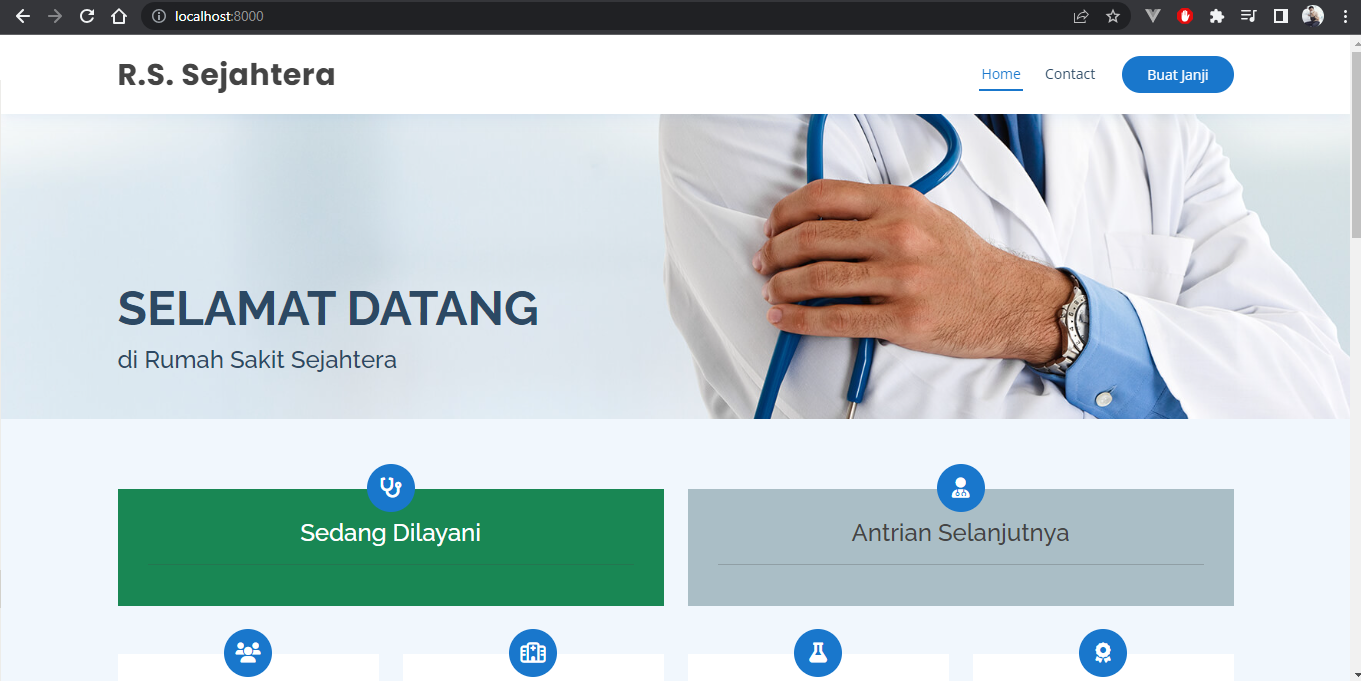
Check app di browser dengan mengakses http://localhost:8000, dan akan menampilkan aplikasi tersebut.
Conclusion
Dengan menggunakan Docker Compose, kita dapat dengan mudah menjalankan aplikasi Rumah Sakit Sejahtera secara lokal. Ini memungkinkan pengembang untuk menguji dan mengembangkan aplikasi dalam lingkungan yang konsisten dan terisolasi. Selain itu, penggunaan Docker Compose juga memudahkan dalam mengelola dependensi dan konfigurasi aplikasi.